


ManaBox MTG
4.31.80K Reviews
App Specs
- Version
- 4.1.15
- Updated On
- License
- Free
- Downloads
- 1,000,000+
- Developer
- SkillDevs SC
- Categories
- Tools
- Platform
- Android
Screenshots
 Analysis by AppCompare
For me, the key question with a Magic: The Gathering companion app is not just how many tools it offers, but how smoothly they fit between browsing cards, tuning a list, and actually playing. ManaBox MTG is a free tools app from SkillDevs SC, and its appeal is straightforward: it brings card reference and deck work together on a phone. I’d look at it as a practical helper for players who want to do more than check a card name, while keeping in mind that some of those tasks are more comfortable when the connection is steady.
When a connection helps most
Network access matters most when I’m checking information that can change, especially market details or recently released cards. A card reference is useful in the middle of a deck-building session, but price information is more time-sensitive: I treat it as a guide for deciding what to investigate, not as a final quote for a trade. If I’m comparing values with another player, I’d still confirm the details before making a decision.
That distinction makes the app easier to use sensibly. I can use a card search to identify a card or revisit a deck idea, then turn to a current connection when I want to check something that may have changed. Rather than assume every screen behaves the same way when a signal drops, I’d plan around the task: reference and planning are one kind of use, while checking fresh information is another.
Useful in short mobile sessions
ManaBox makes the most sense in the gaps around a game: while waiting for a friend, between rounds, or while looking through a binder and wondering whether a card could fit a deck. These are short sessions where a phone-based search can save me from trying to recall a card’s exact name or ability. The deck tools also give me somewhere to capture an idea before it disappears, instead of relying on a note that has no direct link to the cards I’m considering.
A realistic routine might be to review a list before leaving home, notice one weak spot, and use a quiet moment later to search for alternatives. I’d avoid turning that into a hurried purchase decision at the table. Price context can help me prioritize what to look into, but a quick mobile check is not a substitute for comparing the exact card and condition when money or a trade is involved.
What to do when access is unreliable
Connection problems are most frustrating when I expect fresh information to load at the moment I need it. My practical approach is to do the research part before a venue visit: look through the cards, make the deck changes, and keep the list in a state I can use. Then, if reception is poor, I’m not depending on a last-second search to remember what I planned. I would test the particular screens I rely on rather than assume that every card detail or market feature is available in every network situation.
There is a useful trade-off here. A connected tool can bring changing information into the same place as deck planning, but that convenience makes signal quality part of the experience. If I were heading somewhere with unreliable service, I’d prepare in advance and have a simple backup, such as a written deck list for the event. That is less elegant, but it prevents a phone connection from becoming a bottleneck.
Worth Reading Before You Choose

EA SPORTS FC Mobile 26 Is a Bigger Football Game, but It Takes Time

Flipboard Shows What News Apps Must Do Beyond the Feed

Switching to Android Auto Means Rethinking Your Driving Routine

Google Calendar Makes a Crowded Week Easier to Manage

Ludo King Makes the Most of the Minutes Between Plans

Baby Panda World Brings Quick Play to Modern Phones, but Its Game Library Feels Busy
Keeping mobile use intentional
Because the app combines several kinds of reference and collection-related activity, it helps to know what I’m opening it to do. Searching for a card, editing a list, and checking prices are different tasks; separating them keeps a quick check from becoming a long scroll through possible upgrades. I also wouldn’t repeatedly refresh changing information without a reason. A focused search is more useful than treating the app as a live market ticker while I’m trying to play.
The app is free to download and is rated for Everyone, which makes it easy to try with a casual deck project. Optional in-app purchases range from $1.99 to $21.89 per item, so I’d pay attention to what is included before buying anything. If all I want is occasional card lookup, I’d start with the free experience and decide whether a paid option solves a real problem for me rather than assuming it is necessary.
How it fits into an MTG routine
If you're a Magic: The Gathering enthusiast like me, then you're probably always on the lookout for tools that can enhance your gaming experience. Enter ManaBox MTG, an app that promises to be your go-to digital companion in the world of MTG. I spent some time exploring its features, and here's my take on what it has to offer.
The app has been available since October 13, 2018, and its current version is 3.27.0, with Android 7.0 as the minimum operating system. It has passed 500,000 installs and holds a 4.3 average from around 9,000 ratings, alongside roughly 1,700 written reviews. Those figures suggest a well-established audience, though I’d still judge it by whether its specific tools match the way I play.
The first thing you'll notice when you fire up ManaBox MTG is its clean and intuitive interface. Whether you're a seasoned player or a newcomer, the app is designed to be user-friendly. After installing the app, I was greeted by a straightforward home screen that offered quick access to all its features. No clutter, just what you need.
Card research before deck changes
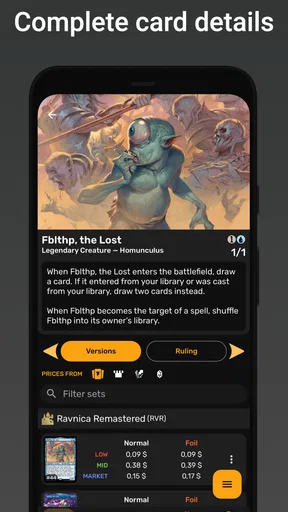
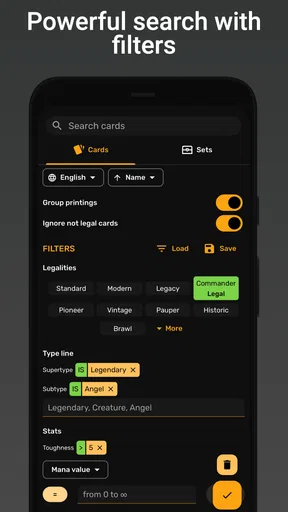
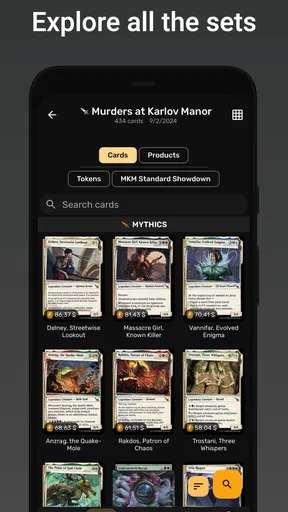
One of the standout features of ManaBox is its extensive card database. It's like having the entire MTG universe in your pocket. You can search for cards by name, set, or even by specific abilities. The search functionality is fast and accurate, which is crucial when you're deck-building or trying to remember that one card you saw in a recent match.
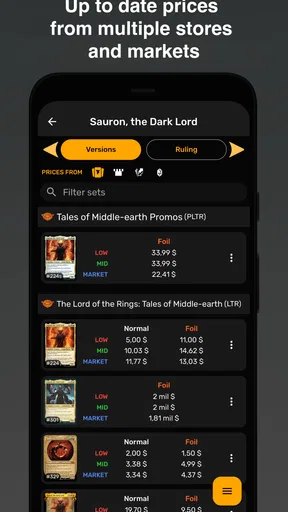
The app also provides detailed information about each card, including its price trends. This is particularly handy for those of us who like to keep tabs on the market value of our collections.
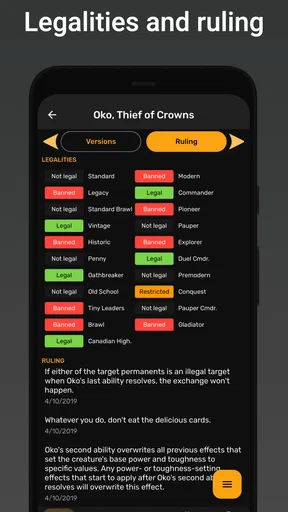
My useful habit would be to search broadly when I’m exploring an idea, then narrow the choices by asking what the deck actually needs: another answer, a smoother curve, or a card that supports the plan I already have. Looking at cards by ability can help when I remember what a card does but not what it’s called. I’d still compare the candidate cards against the rules and format I’m building for; a search result is a starting point, not a guarantee that every option belongs in every list.
Deck testing with a purpose
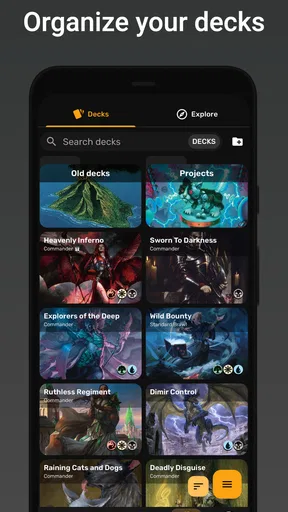
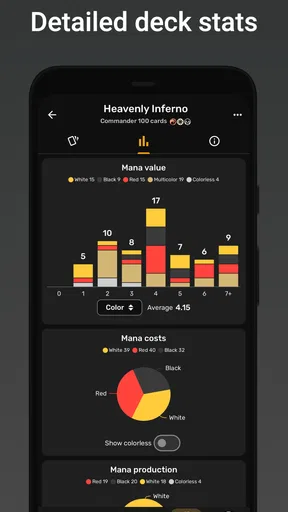
Ah, the art of deck-building! ManaBox makes this process a breeze. You can create and manage multiple decks with ease. What I appreciated most was the ability to simulate draws. It's a great way to test your deck's consistency without having to shuffle a physical deck repeatedly. Plus, the app offers suggestions based on your current deck composition, which can be a lifesaver when you're trying to refine your strategy.
I find draw simulation most useful as a quick diagnostic rather than a verdict on whether a deck is good. If several opening hands lack a play I want early, that gives me a reason to review the list; it does not prove that a proposed change will improve real matches. I’d change one small group of cards at a time and test again, so I can tell which adjustment made the list feel better instead of rebuilding everything at once.
This is where the app differs from the usual alternatives. A basic card-search tool is enough if I only need to settle a rules or identification question, and a spreadsheet can suit someone who wants complete control over a collection or deck data. ManaBox is more appealing when I want card research and deck experimentation in one mobile workflow. The trade-off is that a dedicated specialist tool may be a better fit for a narrow task, while a spreadsheet can be easier to shape around unusual personal tracking habits.
Prices, alerts, and judgment
If you're someone who buys, sells, or trades cards, you'll love the price tracking feature. ManaBox keeps you updated on the latest price changes, and you can set up notifications for specific cards. This way, you won't miss out on a good deal or a prime selling opportunity. It's like having a personal MTG market analyst at your fingertips.
I’d use a notification as a prompt to take another look, not as an instruction to buy or sell. For a card I’m considering, I’d first ask whether it belongs in a deck I actually play; only then would I weigh the price movement. That order matters because market curiosity can easily take over from the original reason I opened the app. Notifications are most useful when I keep the watch list focused on cards I genuinely care about.
Sharing ideas and choosing the right audience
While ManaBox excels in individual play, it also connects you with the larger MTG community. The app regularly updates with the latest card releases and meta changes, ensuring you're always in the loop. There’s even a feature where you can share your decks with friends or the broader community, opening up a world of feedback and collaboration.
That makes it a good fit for a player who enjoys refining lists with other people, but I wouldn’t choose it solely as a social network. If my main goal were long discussions, organized group planning, or a deeply customized collection ledger, I’d use a tool built around that particular job. Here, sharing has the clearest value when I already have a deck to show and want practical reactions to its choices.
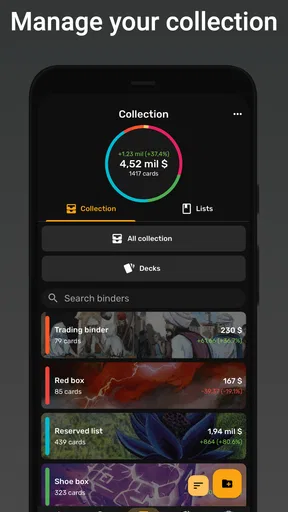
For a newcomer, the combination of card lookup and deck management can make the first experiments less scattered: I can keep a few versions of an idea and compare them without treating every change as permanent. For a competitive player, it is a convenient place to prepare and test, but it should complement actual games and format-specific judgment rather than replace them. A collector focused mostly on inventory may find a specialized cataloging approach more suitable than a deck-first routine.
Preparing around connectivity
One feature that I found particularly useful is offline access. Whether you're at a tournament with spotty Wi-Fi or simply want to conserve data, you can access your decks and card information without an internet connection. It’s a thoughtful touch that shows the developers understand the needs of their users.
In the end, ManaBox MTG offers a comprehensive suite of tools for any Magic: The Gathering player. Its sleek design, coupled with robust features, makes it a must-have app for both casual and competitive players. Whether you're building decks, tracking prices, or just keeping up with the latest releases, ManaBox has got you covered. I’d say give it a try, and it might just become your new favorite MTG companion.
So, if you're ready to level up your MTG game, head over to your app store and check out ManaBox MTG. Happy gaming!
Pros
- Comprehensive card database
- User-friendly interface
- Frequent updates
- Deck building tool
- Price tracking feature
Cons
- Ads can be intrusive
- Requires internet connection
- Limited offline features
- Some features need premium
- Occasional loading delays
FAQs for ManaBox MTG
What is ManaBox MTG and how does it enhance my Magic: The Gathering experience?
ManaBox MTG is a comprehensive app for Magic: The Gathering enthusiasts, offering features like card database access, deck building tools, and pricing information. It enhances your gameplay by providing detailed card information, helping you manage decks effectively, and keeping you updated with the latest card prices across various platforms.
Does ManaBox MTG require an internet connection to function?
While some features of ManaBox MTG, such as card pricing updates and new card data, require an internet connection, the app offers offline capabilities. You can still access your saved decks and previously downloaded card information without an internet connection, making it convenient for on-the-go usage.
How user-friendly is the ManaBox MTG interface for new users?
ManaBox MTG boasts a user-friendly interface designed to cater to both new and experienced Magic: The Gathering players. With intuitive navigation, clear card visuals, and easy access to various features, new users can quickly familiarize themselves with the app's functionalities, while advanced users can dive deeper into detailed options.
Is ManaBox MTG available for both Android and iOS devices?
Yes, ManaBox MTG is available for download on both Android and iOS platforms. The app is optimized for various devices, ensuring a seamless experience whether you're using a smartphone or tablet. Simply visit the Google Play Store or Apple App Store to download the app on your preferred device.
Are there any in-app purchases or subscriptions in ManaBox MTG?
ManaBox MTG offers both free and premium versions. While the free version provides essential features, opting for in-app purchases or a subscription can unlock advanced features, such as ad-free browsing, exclusive card insights, and enhanced deck-building tools. This allows users to tailor their experience according to their needs.


